.svg@webp)
AI Noise Reduction for Photogrammetry in 2026: Lightroom Denoise Tested
 Lukas
Zmejevskis
Lukas
Zmejevskis
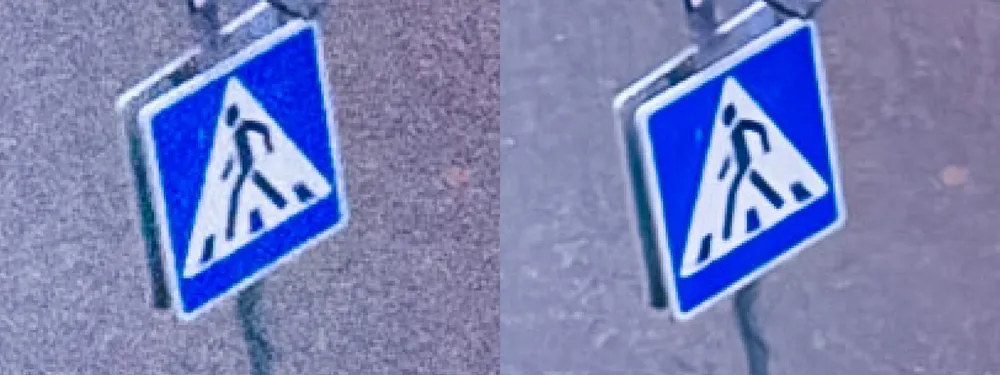
Back in 2023 I wrote about my RAW processing workflow for photogrammetry, compared AI and traditional noise reduction, and then tested what noise reduction does to a 3D reconstruction. The conclusion then was simple: the best results came from RAW files converted without any extra noise reduction. Noisy, but with all of the detail intact and the soundest 3D structure.
AI denoising has come a long way since, and it now sits inside Lightroom as a single button. So it seemed like a good time to check whether that conclusion still holds, this time with real check measurements instead of a visual judgment.
The Short Version
- I ran Lightroom's AI Denoise on the three noisiest sets from my low light roof test and compared them against the same sets without it.
- Denoise made the photos look clean, and made precise measuring points noticeably easier to place.
- It did not improve the reconstruction. Every denoised set produced fewer dense points, and the check measurements were no more accurate.
- It took about two minutes per set of 35 photos, which scales to roughly an hour for a 1,000 photo job.
- The 2023 verdict stands: for measurement, skip it. For a clean looking deliverable, it is fine.
The 2023 Workflow in 2026
The basics of the RAW workflow have not changed. Develop in Lightroom, push highlights down and shadows up to recover detail, set an accurate white balance, keep adjustments modest, and sync identical settings across the whole set. Export at full resolution, keep all metadata so the GPS positions survive, and never add output sharpening or watermarks.
Two things are different. The first is why you would shoot RAW at all. In 2023 the answer was mostly high contrast scenes at sunrise and sunset. After the low light series this autumn, I would add any borderline light, because RAW gives you far more room to recover a dark set than a JPEG does.
The second is AI noise reduction being one click away, which makes it tempting to apply to everything. That is exactly what this test is about.
Why AI Denoise Is a Risk in Photogrammetry
Traditional noise reduction is subtractive. It smooths the image, taking away grain along with some fine detail. AI noise reduction works differently. It has learned what real detail is supposed to look like and rebuilds the image accordingly, which is why the results look so clean.
For a single photo that is a pure win. For photogrammetry it is a potential problem, and I pointed it out back in 2023. Every photo in a set is denoised separately, so the rebuilt detail can come out slightly different in each frame. Photogrammetry depends on finding the same feature in many overlapping photos. Detail that varies between frames is not detail to the software, it is inconsistency.
The Test
The photos are from Part 2 of the low light series: a Mavic 4 Pro orbit of a residential roof in heavy overcast, all at 1.7 m/s, about 35 photos per set. I used the three sets where noise was the main problem rather than blur: ISO 6400, 3200 and 1600. Below that, the photos were limited by motion blur, and no noise reduction can fix blur.
Each set was processed twice in Lightroom with identical settings, once as before and once with AI Denoise added. I used a strength of 70, which to my eye removes virtually all of the bad looking noise. Same JPEG export, then the same default medium settings in Pixpro.
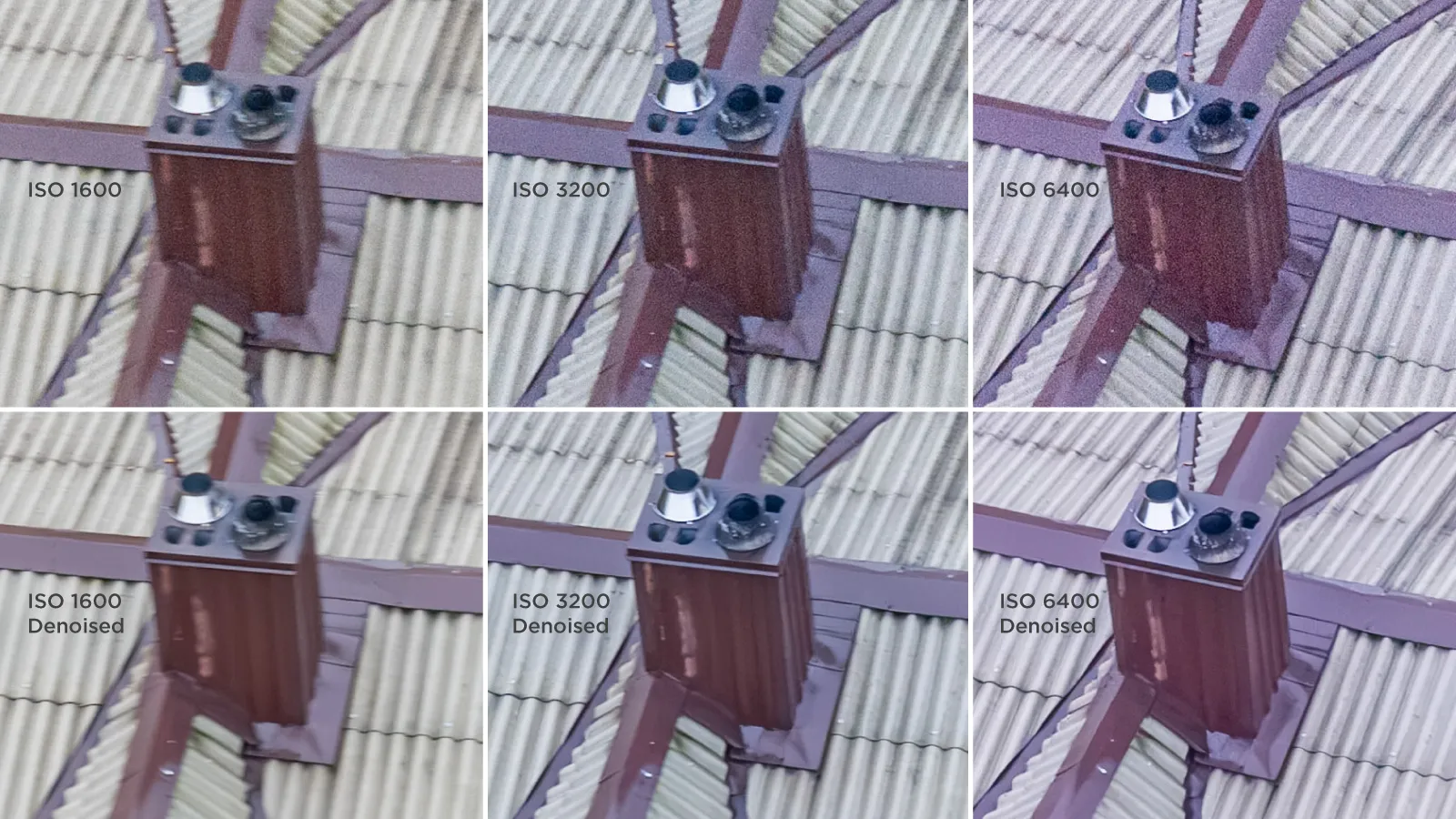 To judge the results I used the method from the measurement validation article: two objects measured with a tape on site, a 3,000 mm zebra crossing stripe at the edge of the scene and a 1,210 mm roof window side near the center, both measured in Pixpro with projections.
The Results
| ISO | Denoise | Dense points | Zebra (3,000 mm) | Error | Window (1,210 mm) | Error |
|---|---|---|---|---|---|---|
| 6400 | No | 1.39 M | 3,013 | +13 mm | 1,224 | +14 mm |
| 6400 | Yes | 1.30 M | 3,005 | +5 mm | 1,234 | +24 mm |
| 3200 | No | 1.41 M | 3,058 | +58 mm | 1,231 | +21 mm |
| 3200 | Yes | 1.39 M | 3,059 | +59 mm | 1,240 | +30 mm |
| 1600 | No | 1.39 M | 2,994 | -6 mm | 1,208 | -2 mm |
| 1600 | Yes | 1.38 M | 2,958 | -42 mm | 1,200 | -10 mm |
What the Numbers Show
Fewer points, every time. Every denoised set produced a smaller dense cloud. The biggest drop was at ISO 6400, about 6 percent, which is the set where Denoise had the most work to do. That fits how noise reduction works: smoothing away grain also smooths away some of the fine texture that dense matching relies on.
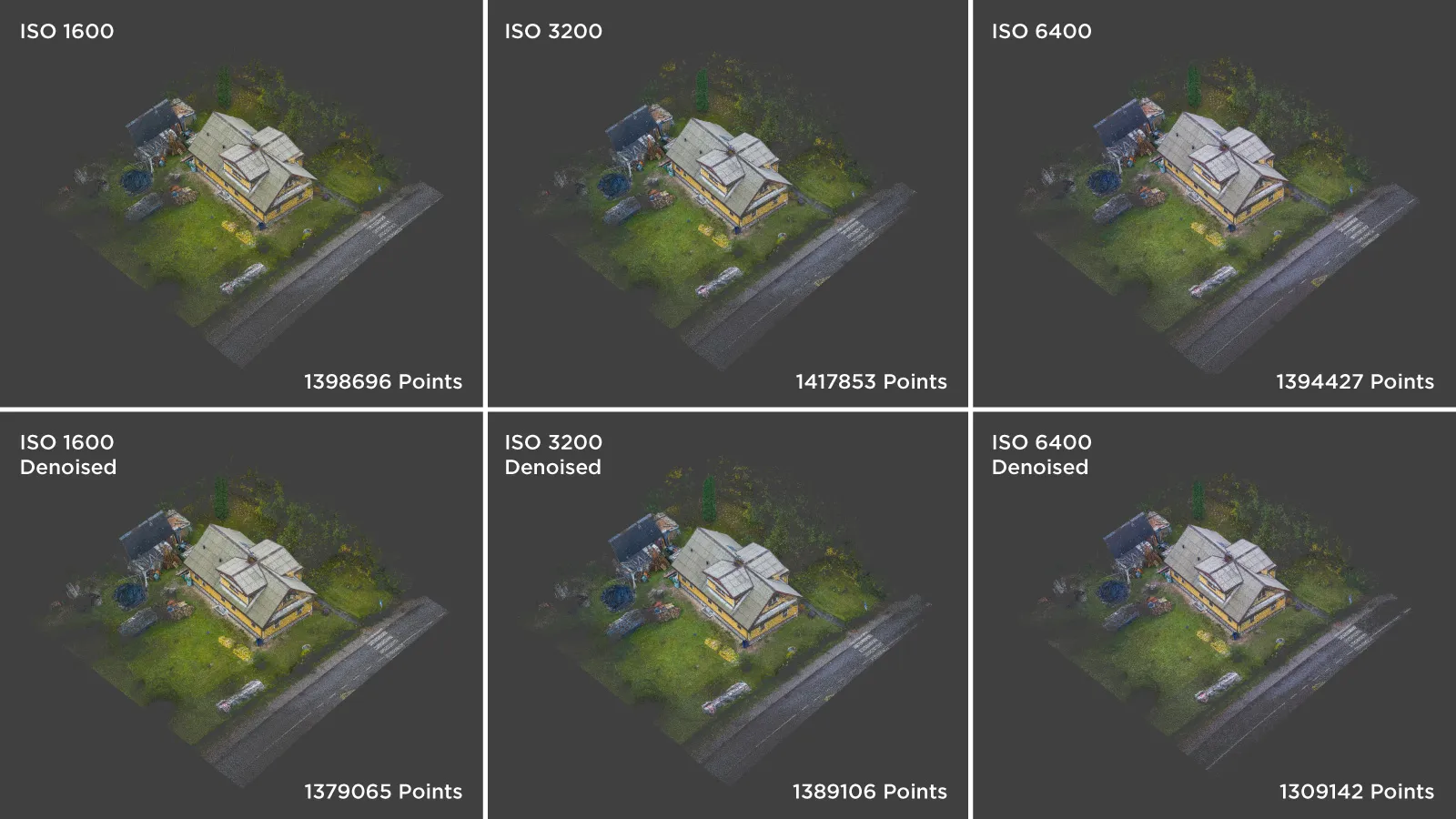 No gain in accuracy. Of the six check measurements, four got clearly worse with Denoise, one stayed within a millimeter, and one got better, the zebra at ISO 6400, while the window in the same set went the other way. At ISO 1600, the cleanest set, both measurements moved further from the truth. These are single runs and the differences are a few millimeters to a few centimeters, so I would not read them as proof that Denoise damages a model. But there is clearly no improvement.
The scale error did not care. ISO 3200 was off by about +2 percent on both objects before, and it still is after. As explained in the validation article, matching errors like that come from scale, most likely the drone's GPS, and processing the photos differently does nothing about it.
The cloud looked about the same. The denoised dense clouds looked good, but not markedly better than the noisy ones.
Easier to Measure, Not More Accurate
The one clear benefit was in measuring. On the clean, denoised photos, placing projections was noticeably easier. Corners were crisp, edges were obvious, and there was no grain to guess through.
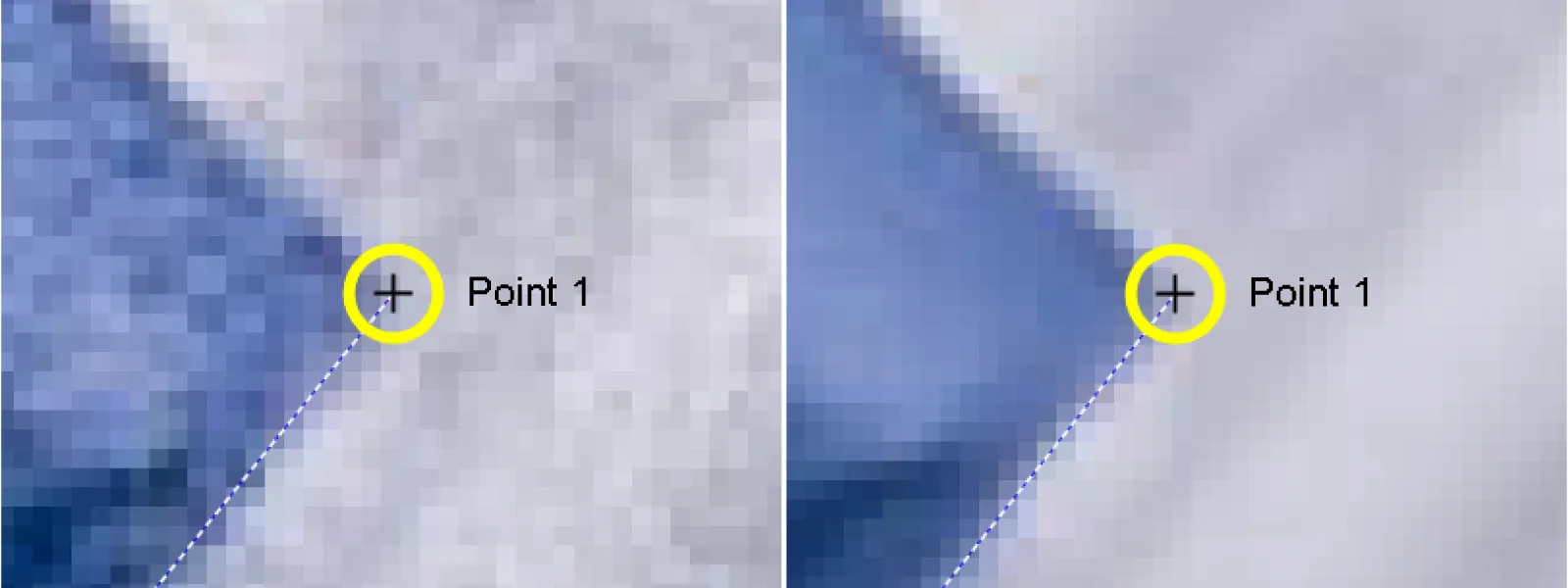 And yet the measurements did not get better. My best explanation is that a crisp corner on a denoised photo is partly the denoiser's best guess at where that corner should be. It looks precise, and it is easy to click on, but looking precise and being in exactly the right place are not the same thing. It is a small trap: the photo gives you confidence that the numbers do not back up.
The Time Cost
Denoise took about two minutes per set on a decent PC, so about three and a half seconds per photo. For a 35 photo roof that is nothing. For a 1,000 photo site it is close to an hour of extra processing before the reconstruction even starts, for no measurable gain.
Verdict
The 2023 conclusion holds. For measurement work, skip AI noise reduction and process the RAW files without it. The noisy set reconstructs at least as well and measures at least as accurately, and it costs you nothing in time.
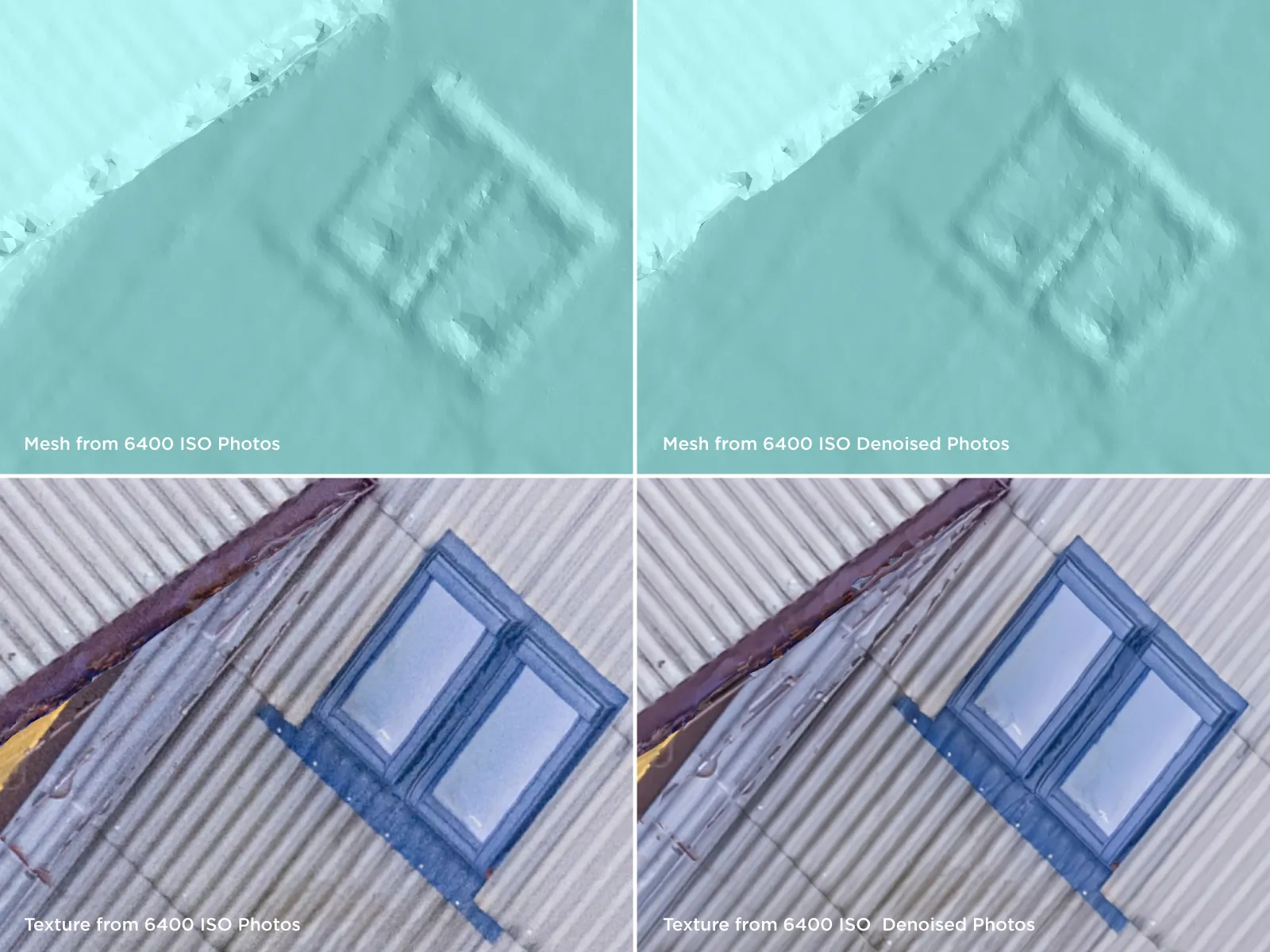 Where Denoise does make sense is presentation. If the client will look at the textured mesh rather than measure it, a clean texture is worth a couple of minutes. In that case the 2023 advice still applies: measure on the version processed without noise reduction, and show the client the clean one.
Conclusion
AI noise reduction is impressive, and on a single photo it is close to magic. Photogrammetry is not a single photo, though. It is dozens or hundreds of photos that have to agree with each other, and a tool that rebuilds each one separately does not help with that, even when every frame looks perfect.
Three years and a much better denoiser later, the answer is the same. Clean looking photos are nice to work with. They are not more accurate.
Frequently Asked Questions
Should I use AI noise reduction for photogrammetry in 2026?
Not for measurement work. In this test, Lightroom's AI Denoise reduced the dense point count in every set and did not improve accuracy against tape measured check distances. It is fine for presentation, where the client looks at the texture rather than measuring it.
Does Lightroom Denoise improve 3D reconstruction?
Not in this test. Denoised sets produced 1 to 6 percent fewer dense points, with the largest drop on the noisiest photos, and the clouds did not look markedly better than the noisy originals.
Why can AI noise reduction be a problem for photogrammetry?
AI denoisers rebuild detail in each photo separately, so the same feature can come out slightly different in overlapping frames. Photogrammetry relies on matching identical features across photos, and inconsistent detail works against that.
Does noise reduction make photogrammetry measurements easier?
Easier to place, yes. Clean photos make it much easier to mark corners precisely with projections. But in this test the resulting measurements were not more accurate, so the ease of clicking can be misleading.
How long does Lightroom AI Denoise take?
About two minutes for a set of 35 drone photos on a decent PC, so roughly three and a half seconds per photo. A 1,000 photo project would add close to an hour of processing.
Photographer - Drone Pilot - Photogrammetrist. Years of experience in gathering data for photogrammetry projects, client support and consultations, software testing, and working with development and marketing teams. Feel free to contact me via Pixpro Discord or email (l.zmejevskis@pix-pro.com) if you have any questions about our blog.
Related Blog Posts
Our Related Posts
All of our tools and technologies are designed, modified and updated keeping your needs in mind
How to Check a Point Cloud You Do Not Trust: Validating Measurements With Known Dimensions
Measure something real in the scene, measure the same thing in the model, and compare. That is the whole technique.
 Pixpro Team
Shutter Speed, ISO and Motion Blur in Drone Photogrammetry
This is a two part article. This first part is the lesson: what shutter speed, ISO and motion blur actually do to a photogrammetry dataset, how they trade against each other, and where the line sits between flying through a scan and stopping for every photo.
Pixpro Team
Satellite, Airplane, Drone: The Three Scales of Photogrammetry
Most of what we write about here happens below 120 meters. But photogrammetry did not start with drones and it does not stop with them.
Pixpro Team
Ready to get started with your project?
You can choose from our three different plans or ask for a custom solution where you can process as many photos as you like!
Free 14-day trial. Cancel any time.