.svg@webp)
How to Check a Point Cloud You Do Not Trust: Validating Measurements With Known Dimensions
 Lukas
Zmejevskis
Lukas
Zmejevskis
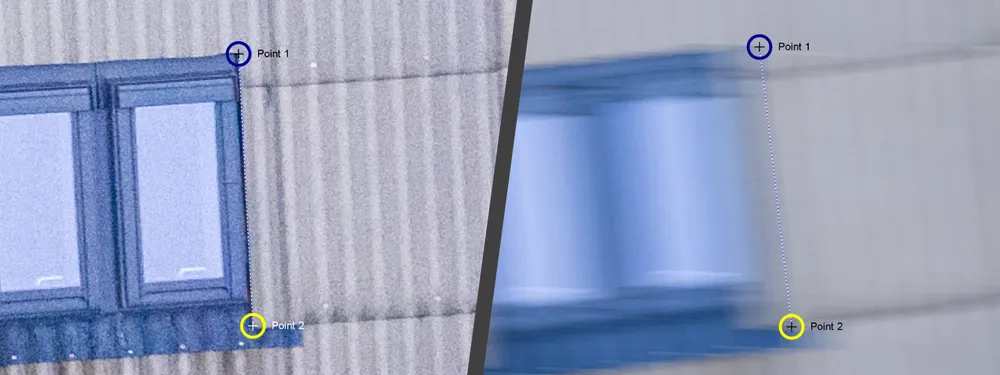
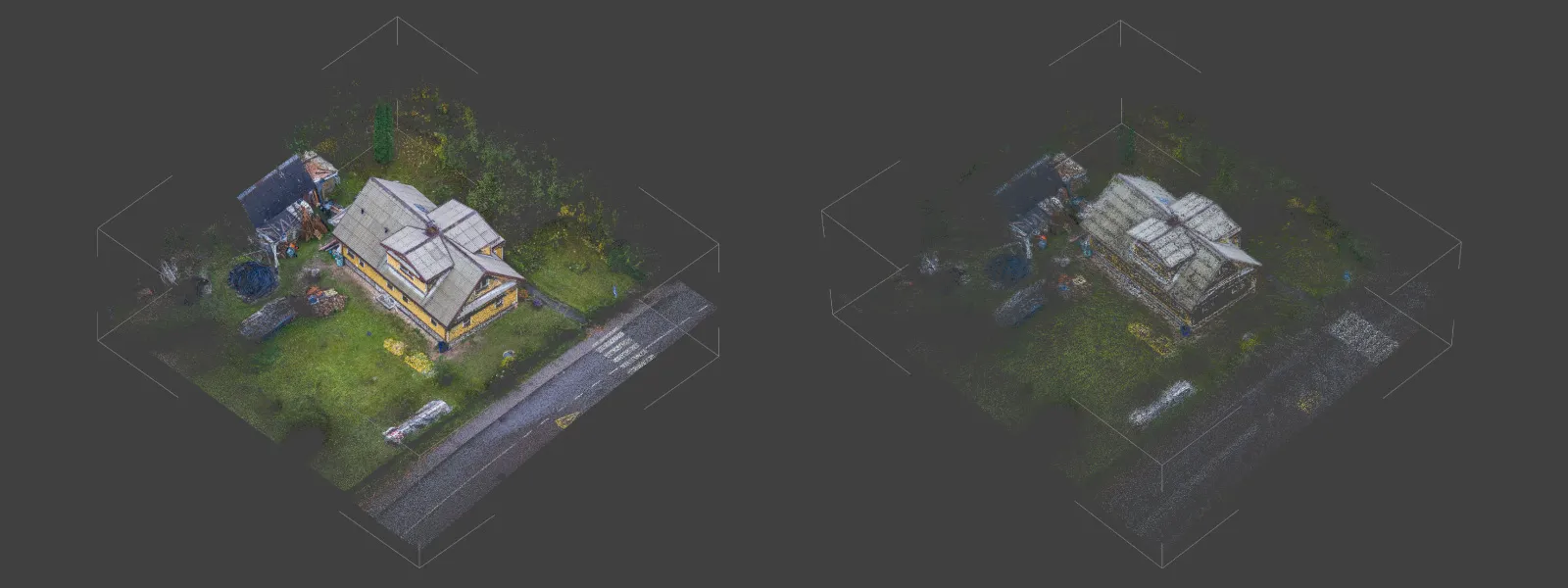
In Part 2 of the low light series I flew the same roof seven times, from ISO 6400 and a fast shutter down to ISO 100 and a quarter of a second, and judged the results by eye. Point counts, warping, how noisy the edges looked, and whether the measurements seemed about right.
Seemed is the problem. So this time I compared every dataset against two objects in the scene that I had measured with a tape on site. It is the simplest way there is to find out whether a point cloud you do not trust deserves to be trusted.
The Short Version
- Measure something real in the scene, measure the same thing in the model, and compare. That is the whole technique.
- Use at least two check measurements, in different parts of the scene and in different directions. One proves almost nothing.
- If every check is off by the same percentage, the model is just scaled wrong, which is easy to fix. If the checks disagree, the model is distorted, and no rescaling will save it.
- In this test, the clean sets landed within about 2 percent. Real accuracy broke down from ISO 400, and the eye based verdict in Part 2 had been too generous.
- Blur does not only damage the model. It also makes precise measuring impossible, even with the most accurate method available.
Why Looks and Point Counts Are Not Enough
Part 2 already showed that dense point count is a poor measure of quality. The count stayed flat while warping was creeping in. Looks are not much better. A noisy cloud can measure surprisingly well, and a cloud that looks fine can be quietly bent. The only way to know what a model is worth for measurement is to measure it against something you already know.
Measuring in Pixpro: In the 3D Scene or From the Photos
There are two ways to place measurement points in Pixpro, and they are not equally precise.
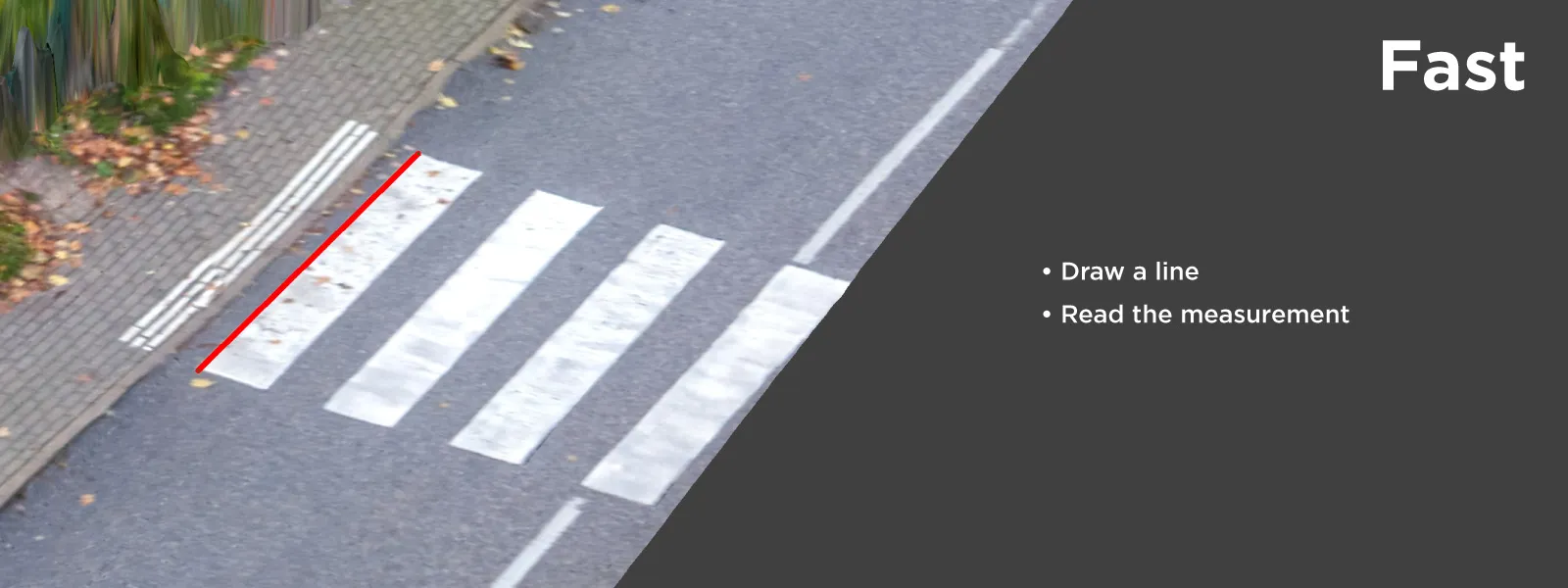
In the 3D scene. You click points directly on the point cloud or the DEM. Linear measurements, distances between two points, can be taken straight on the cloud. Volumes need a surface, so they are measured on a DEM layer. This is the quick and easy way, and it is fine for rough checks.
 From the photos, with projections. Instead of clicking a point in the 3D scene, you mark the same physical point, say the corner of a window, in several of the original photos. Pixpro then calculates the point's 3D position from the rays through each of those photos. Projections are not tied to one layer, so they work for measurements on both the point cloud and the DEM. It is a bit more tedious, and much more precise.
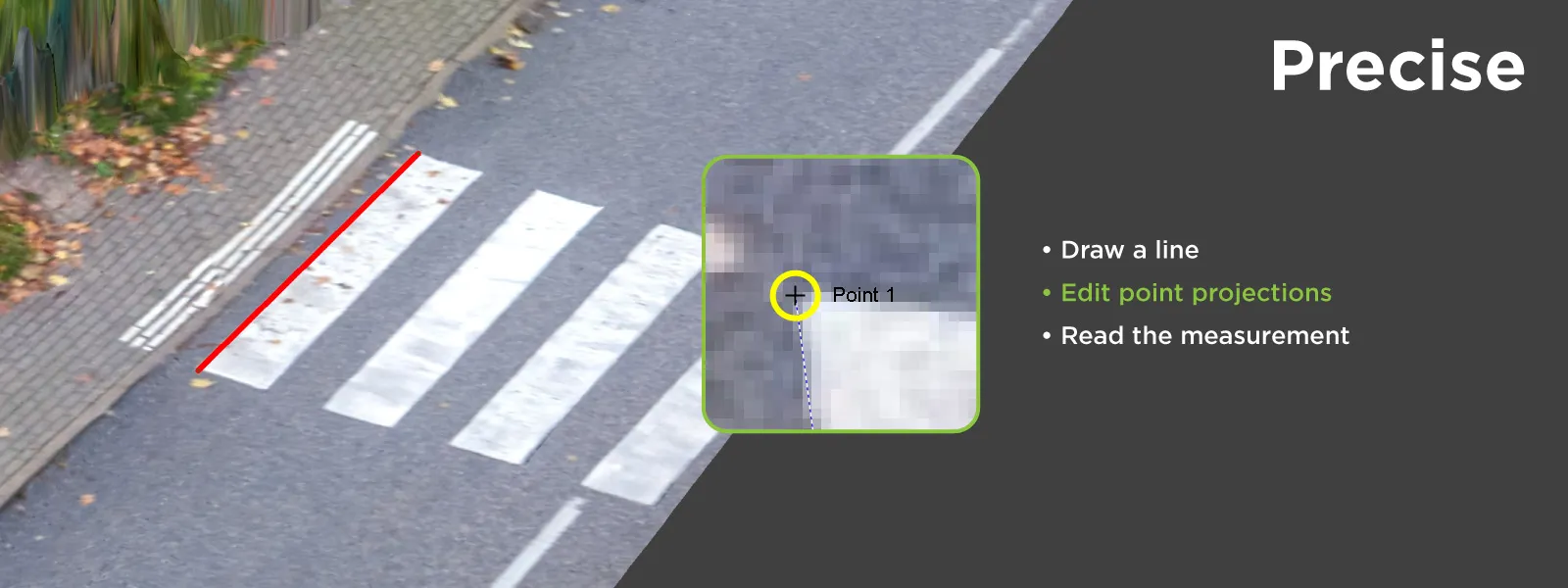 The reason is simple. A point cloud is a reconstruction, a step removed from the original data, with its own noise and gaps. The photos are the original data, at full resolution. Marking a point in the photos uses every pixel of detail the camera captured, and every extra photo adds another ray that has to agree on the same position. The more photos you mark, the better. Every measurement in this article was taken with projections.
The Method
The idea is quite simple: find something in the scene with a length you know, measure it in the model, and compare. The work is in choosing what to measure.
A good check object is stable, so it cannot have moved between the flight and the tape measure. It has sharp, unambiguous endpoints you can find again in a photo. It is long enough to matter, because a 30 cm object measured to the nearest centimeter tells you very little. Painted road markings, roof windows, solar panels, door frames and paving lines are all good candidates around a typical residential job.
Most importantly, take samples from across the whole scene. A model can measure perfectly in one spot and be distorted somewhere else. Different locations, different directions, and some vertical component where you can get it.
The Test
Same seven datasets as Part 2: a Mavic 4 Pro orbit of a residential roof, 35 m radius at 25 m height, roughly 8 mm per pixel on the roof. No ground control on this one, so scale comes from the drone's GPS alone.
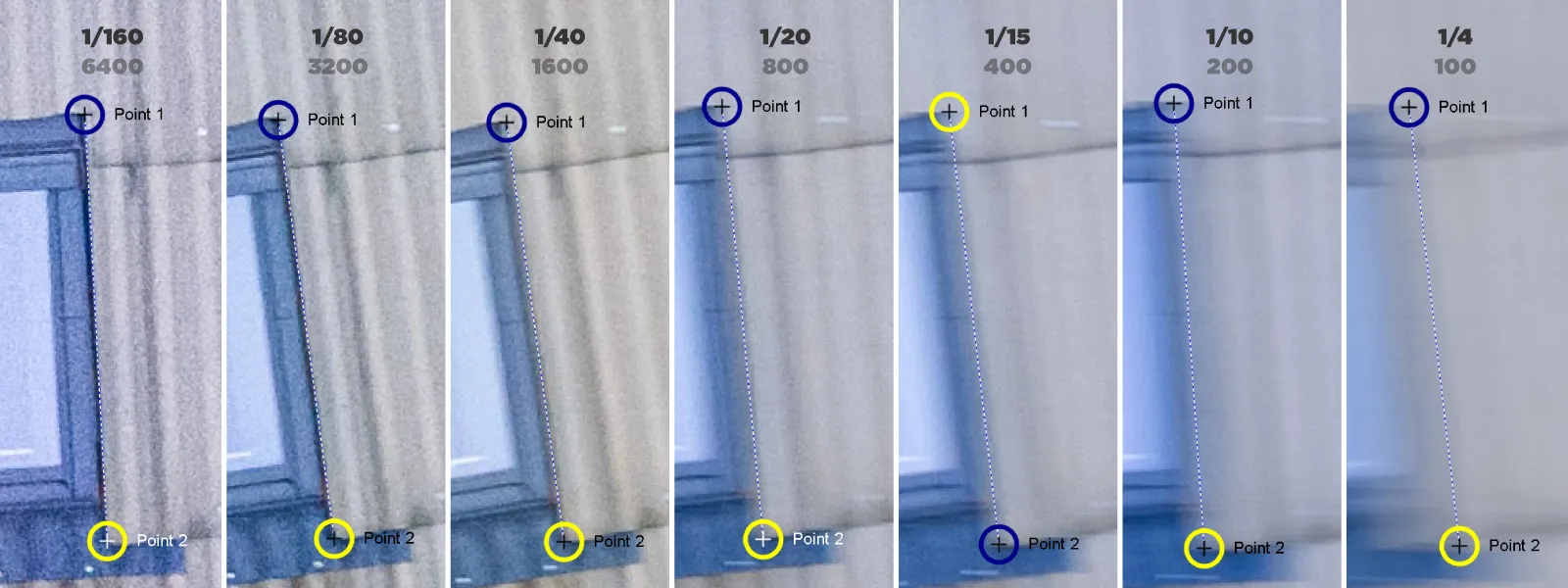
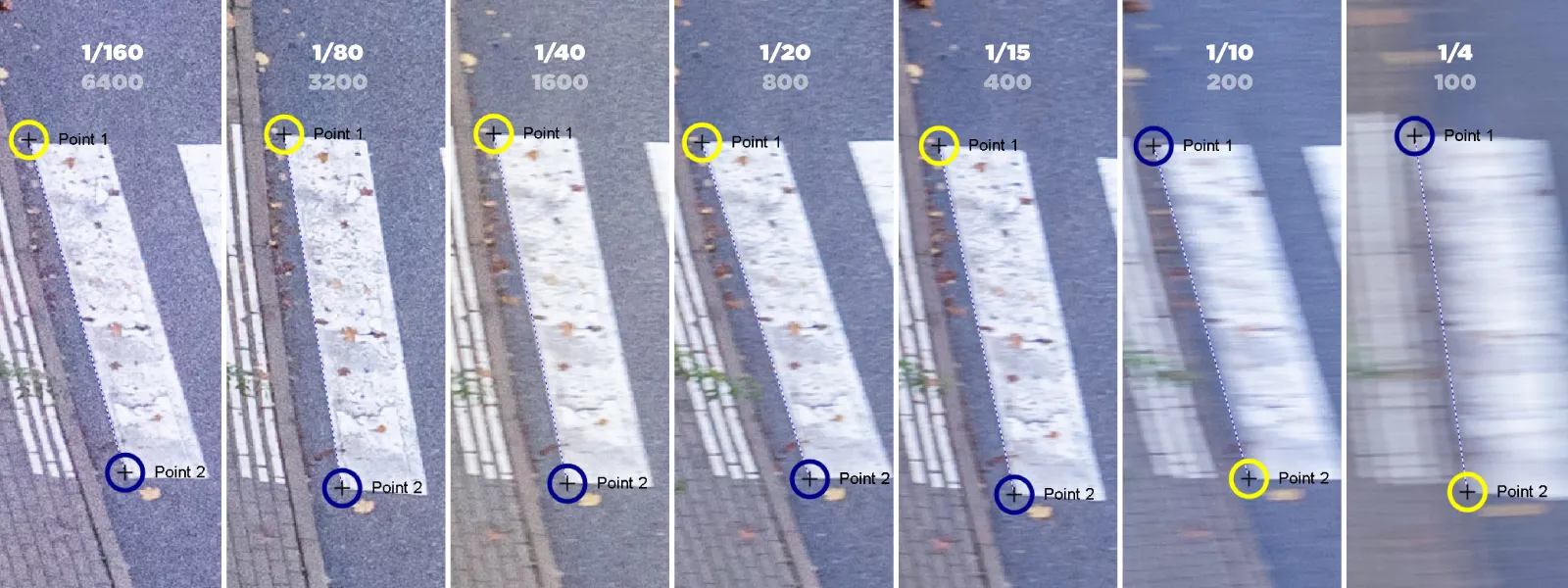 Two check measurements, both taken with a tape on site:
- A zebra crossing stripe, 3,000 mm, at the edge of the scene.
- The side of a roof window, 1,210 mm, near the center of the scene. The roof is pitched at about 40 degrees, so this one has a strong vertical component too.
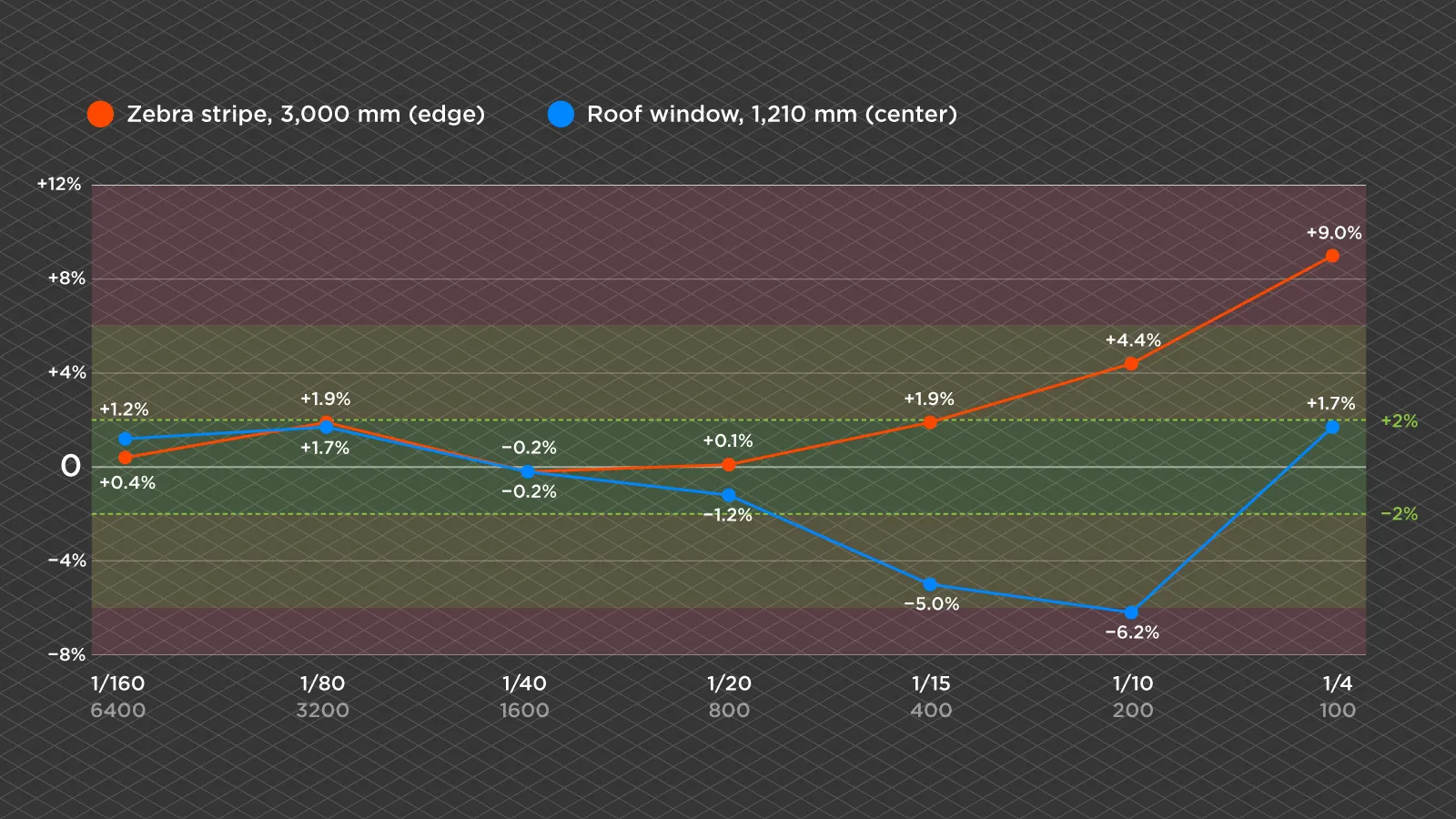
| ISO | Zebra (3,000 mm) | Error | Window (1,210 mm) | Error |
|---|---|---|---|---|
| 6400 | 3,013 | +13 mm, +0.4% | 1,224 | +14 mm, +1.2% |
| 3200 | 3,058 | +58 mm, +1.9% | 1,231 | +21 mm, +1.7% |
| 1600 | 2,994 | -6 mm, -0.2% | 1,208 | -2 mm, -0.2% |
| 800 | 3,004 | +4 mm, +0.1% | 1,195 | -15 mm, -1.2% |
| 400 | 3,057 | +57 mm, +1.9% | 1,150 | -60 mm, -5.0% |
| 200 | 3,133 | +133 mm, +4.4% | 1,135 | -75 mm, -6.2% |
| 100 | 3,271 | +271 mm, +9.0% | 1,230 | +20 mm, +1.7% |
What the Numbers Show
Scale error and distortion look different. At ISO 3200, both checks are off by almost exactly the same amount, about +1.8 percent. When every measurement agrees like that, the model is not bent, it is simply a little too big, most likely because the drone's GPS put the cameras slightly too far apart. That is the easy kind of error. One known distance through manual referencing, or a few ground control points, puts it right.
At ISO 400, the zebra is +1.9 percent and the window is -5.0 percent. Those do not agree, so the shape itself is wrong. Rescaling would fix one measurement and make the other worse. With a single check you cannot tell these two situations apart, which is the best argument there is for taking more than one.
One measurement can lie. At ISO 100, the dataset I called useless in Part 2, the window measures within 1.7 percent. On its own that looks like a pass. The zebra in the same set is off by 9 percent. And the window result was luck. On photos that blurry, marking a corner precisely is not possible, so that measurement is closer to an educated guess that happened to land near the truth. A single lucky check would have passed the worst dataset in the whole test.
 Blur hurts the measuring, not just the model. From ISO 400 down, precise placement of projections was no longer possible, because the corner I was trying to mark was a smear several centimeters wide. Part of the error in those rows comes from the measuring itself. Projections are the most accurate method available, but they can only be as precise as the photos they are marked on.
The eye was too generous. Part 2 called ISO 400 "measurements decent" and ISO 200 "in the ballpark". The tape says ISO 400 is already 5 percent out on the window, and ISO 200 is 6 percent out. ISO 6400 through 800 all land within about 2 percent, and the real breakdown starts at 400, right where the projections became hard to place. That is exactly why a looks-fine verdict is not good enough for anything that will be used as a number.
Two smaller observations. ISO 1600 measured best of all, which suggests that among the clean sets, the variation in GPS scale from one flight to the next matters more than any difference in blur or noise. And in the worst sets, the zebra at the edge of the scene went far worse than the window near the center, which fits the noisy, warpy edges seen in Part 2. With only two checks I would not call that a rule, but it is a reason to always include one measurement near the edge of your model.
Why Volumes Suffer More
Everything above is about lengths, and lengths are the forgiving case. A distance depends on two points. A volume depends on the entire surface of the DEM, and every small height error across that surface gets added up. A slight bend that costs a length measurement a percent or two can cost a volume measurement considerably more, and volumes are also much harder to check, because you rarely have something large and stable with a precisely known volume lying around. If a dataset is borderline for lengths, treat it as unfit for volumes.
What This Does Not Tell You
Known dimensions check scale and shape, which is relative accuracy. They say nothing about where the model sits on the map. This test had no ground control, so the models could be shifted by a meter or more and still pass every check here. If absolute position matters, that is a job for ground control points, and you would check it against measured coordinates rather than lengths. The older article on the accuracy of your photogrammetry project goes into both.
Rules of Thumb
- Always take at least two check measurements, spread across the scene and in different directions. More is better.
- Compare the percentages, not just the millimeters. Matching errors mean scale, mismatched errors mean distortion.
- Include one check near the edge of the model, where distortion tends to show up first.
- Measure with projections, marked in as many photos as you can.
- If you cannot place a projection precisely, do not trust the number, even if it looks right.
- Treat volumes more strictly than lengths. A borderline dataset for lengths is not good enough for volumes.
Conclusion
Checking a point cloud against known dimensions takes a tape measure, two or three minutes on site and a few clicks afterwards, and it turns "seems fine" into an actual number. In this test it also showed that my own visual judgment from last week was too optimistic, and that the worst dataset could have passed a single check by sheer luck.
That is the real lesson of this low light series. The software will reconstruct far more than you expect, and the model will often look better than it measures. Validate it before anyone relies on it.
Frequently Asked Questions
How do I check the accuracy of a photogrammetry model?
Measure a few objects in the scene with a tape, measure the same objects in the model, and compare. Use at least two measurements in different parts of the scene and in different directions. This checks relative accuracy, meaning scale and shape. Absolute position needs ground control points.
How many check measurements do I need?
At least two, and more is better. With one measurement you cannot tell whether an error is a simple scale problem or real distortion, and a single measurement can pass by luck, as one did in this test on the worst dataset.
What are projections in photogrammetry?
A way of measuring where you mark the same physical point in several of the original photos, and the software calculates its 3D position from the rays through them. It is more accurate than clicking on a point cloud, because it works from the full resolution photos, and it improves with every photo you mark.
What is the difference between scale error and distortion?
Scale error makes the whole model too big or too small by the same percentage everywhere, and one known distance or a few ground control points fixes it. Distortion bends the model, so different measurements are off by different amounts, and rescaling cannot fix it.
Are volume measurements as accurate as length measurements?
Usually not. A length depends on two points, while a volume adds up height errors across a whole surface, so small distortions accumulate. A dataset that is borderline for length measurements should not be trusted for volumes.
Photographer - Drone Pilot - Photogrammetrist. Years of experience in gathering data for photogrammetry projects, client support and consultations, software testing, and working with development and marketing teams. Feel free to contact me via Pixpro Discord or email (l.zmejevskis@pix-pro.com) if you have any questions about our blog.
Related Blog Posts
Our Related Posts
All of our tools and technologies are designed, modified and updated keeping your needs in mind
Shutter Speed, ISO and Motion Blur in Drone Photogrammetry
This is a two part article. This first part is the lesson: what shutter speed, ISO and motion blur actually do to a photogrammetry dataset, how they trade against each other, and where the line sits between flying through a scan and stopping for every photo.
 Pixpro Team
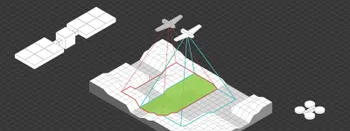
Satellite, Airplane, Drone: The Three Scales of Photogrammetry
Most of what we write about here happens below 120 meters. But photogrammetry did not start with drones and it does not stop with them.
Pixpro Team

Photogrammetry Gear Guide 2026: What a Complete Setup Actually Costs
Nobody buys a camera and then does photogrammetry with it. You need something to capture with, something to process with, and something to process on, and this year the third one is the most interesting decision of the three.
Pixpro Team
Ready to get started with your project?
You can choose from our three different plans or ask for a custom solution where you can process as many photos as you like!
Free 14-day trial. Cancel any time.